Decision methodology
Constraints, C-Codes, and RAO
How AIM turns budgets, deadlines, regulatory obligations, organizational realities, and risk appetite into traceable recommendation scores.

AIM uses constraints and scoring to stay grounded in your reality — budgets, deadlines, laws, and politics — not generic "best practices."
This page explains:
- What constraint codes (C-1, C-2, C-3…) mean
- How AIM uses them in recommendations and reports
- How RAO (Ranking and Optimization) scoring works
1. What Are Constraint Codes?
When you enter free-text constraints such as:
"We must be live by December 2026. Budget is capped at $750k. We handle resident payment data and property records. We have limited staff and can't run complex on-prem environments."
AIM's Constraint Normalizer:
- Splits the text into atomic constraints
- Classifies each by type
- Assigns a stable ID – C-1, C-2, C-3…
Example classification:
Must be live by December 2026.
Budget is capped at $750k.
We handle resident payment data and property records.
We have limited staff and can't run complex on-prem environments.
You'll see these codes referenced in reports and recommendations.
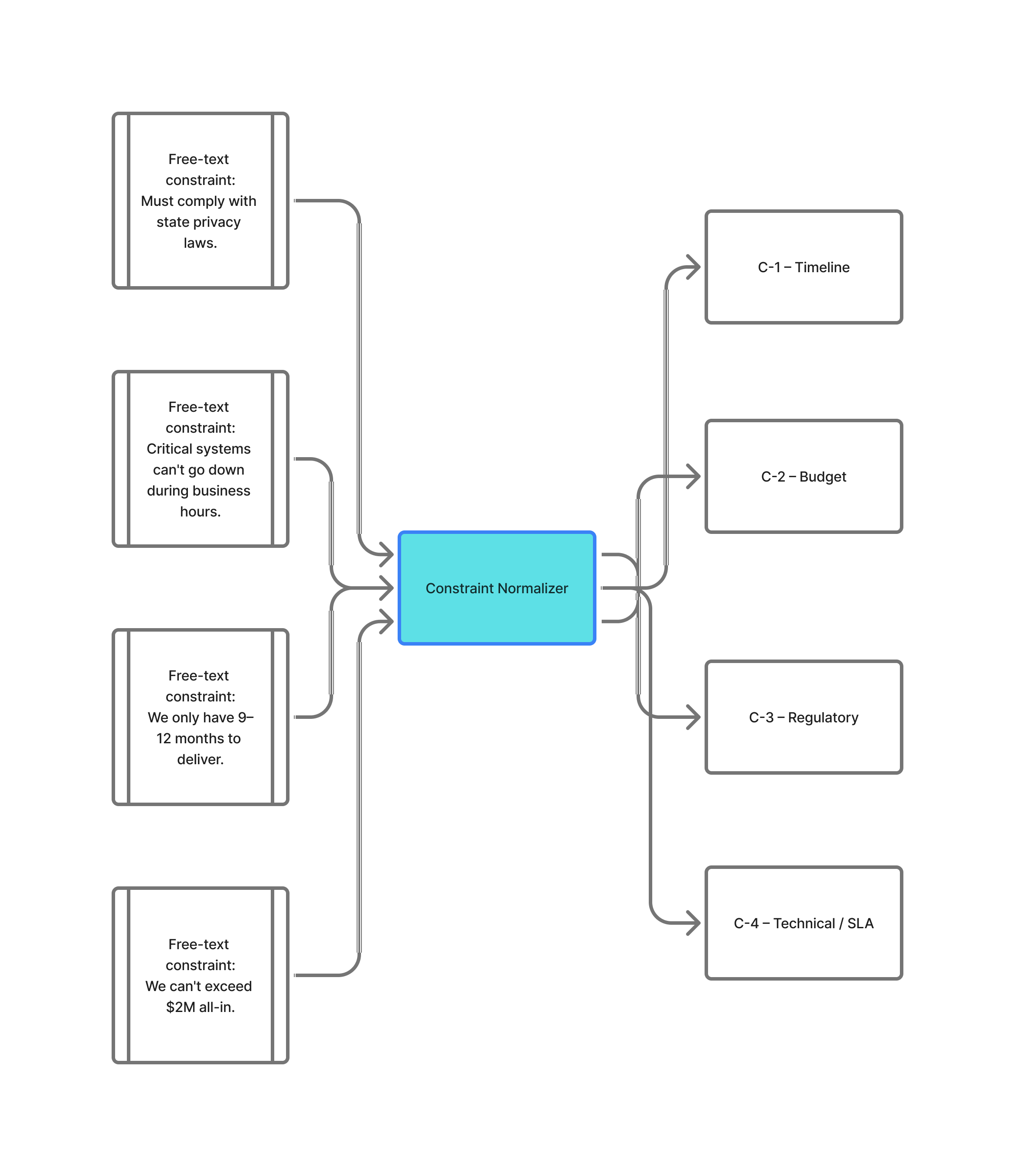
AIM Constraint Normalization
What This Diagram Shows
AIM automatically turns your free-text constraints into structured, machine-readable items (C-1, C-2, C-3, etc.).
This matters because clean, consistent constraint codes allow AIM to generate accurate recommendations, roadmaps, and modernization reports without misinterpreting your inputs.
Why Constraint Normalization Exists
Most teams describe constraints in plain language:
- "Must launch within 9 months."
- "We can't exceed a $2M budget."
- "System can't go down during business hours."
- "Must comply with state privacy rules."
Human-readable, but not machine-friendly.
AIM's Constraint Normalizer parses your text, identifies the type of constraint, then converts it into a simple numbered code. This gives you:
- Consistency – Clear, reusable IDs across the entire assessment
- Traceability – Reports can reference "C-2" instead of repeating paragraphs
- Accuracy – Reduces ambiguity and prevents hallucinated requirements
- Decision support – AIM ties recommendations directly back to the exact constraint
How It Works
- You write your constraints in normal language.
- AIM breaks them into individual rules.
- AIM classifies each rule (Timeline, Budget, Regulatory, Technical, SLA, etc.).
- Each one receives an ID:
- C-1 — Timeline
- C-2 — Budget
- C-3 — Regulatory
- C-4 — Technical / SLA
- (Additional categories expand as needed.)
These codes appear throughout all recommendations, insights, roadmaps, and PDFs.
Where You'll See These Codes
- Constraints & Requirements page – Every constraint displays its C-# code
- Recommendations – AIM shows which constraints each recommendation solves
- Modernization Reports – Snapshot section references C-1, C-2, etc.
- Roadmaps – Constraints map directly to phases and priorities
Why This Matters for You
This system enables AIM to:
- Avoid hallucinated requirements
- Tie every recommendation to a real constraint
- Produce CIO-ready reports with clean reference links
- Ensure consistency across your entire modernization plan
It's one of the core engines that makes AIM accurate, explainable, and trustworthy.
2. Constraint Categories
AIM currently groups constraints into categories like:
Timeline
go-live deadlines, phasing requirements
Budget
caps, funding cycles, "must stay within existing OPEX"
Regulatory / Policy
HIPAA, CJIS, PCI, state/local statutes
Technical / SLA
uptime targets, RPO/RTO, performance
Data / Residency
PHI/PII, locality requirements, retention rules
Security / Compliance
encryption, access controls, auditability
Architecture / Dependency
"must integrate with X", mainframe realities, vendor lock-in
Organizational / Operational
staff skills, support hours, unions, politics
Other
anything unique to your situation
Each normalized constraint keeps:
- Full original text
- Category and label
- ID (C-1, C-2, etc.)
3. How AIM Uses Constraint Codes
Constraint codes are used to:
1. Drive Recommendations
Each recommendation is tagged with the constraints it honors, e.g.:
"This option best satisfies C-1 (timeline) and C-2 (budget) while partially addressing C-4 (staffing)."
2. Structure Reports
In modernization briefs you'll see:
- A Constraints Snapshot table listing C-1, C-2, etc.
- References in strategy sections like:
"Phase 1 focuses on satisfying C-1 (December 2026 deadline) and C-3 (data sensitivity)."
3. Enable Tradeoff Discussions
Decision-makers can ask:
- "If we relax C-2 (budget) slightly, can we better satisfy C-4 (staffing)?"
- "Which recommendations ignore C-3 (compliance) and why?"
The codes give everyone a shared vocabulary.
4. What Is RAO?
RAO = Ranking and Optimization.
Instead of asking an LLM to "be smart," AIM:
- Retrieves relevant patterns, reference architectures, and technology options
- Scores candidate approaches across dimensions like:
- Cost
- Maturity
- Security & compliance
- Vendor lock-in risk
- Operational complexity
- Supply Chain Assurance when current product evidence and explicit organizational tolerance exist
- Strategic fit vs your C-constraints
- Optimizes for the best overall fit, not just the loudest vendor
The output is a RAO score (e.g., 96.8 / 100) with a breakdown by dimension.
Why Supply Chain Assurance is conditional
The six core dimensions remain available for every recommendation. Supply Chain Assurance becomes a seventh dimension only when AIM has a current, product-specific evidence-backed score and the assessment records an explicit supply-chain risk tolerance. Missing evidence is never replaced with a neutral score.
Explore the Supply Chain Assurance methodology →5. How RAO and Constraints Work Together
For each recommendation, AIM looks at:
- Scores across dimensions
- Constraint coverage (`addresses: [C-1, C-3, C-4]`)
- Risk and integration impacts
Example:
Recommendation A
RAO Score: 93.8
Best fit for: C-1 (timeline), C-3 (data compliance), C-4 (staffing)
Tradeoff: Higher cost vs alternatives (C-2).
This gives you:
- A ranked list of options
- Clear constraint coverage
- Transparent tradeoffs
You're never stuck with "AI said so."
How RAO Weights Adapt to Your Priorities
RAO doesn't use fixed weights. The importance of each scoring dimension adjusts dynamically based on your assessment inputs:
Pain Points Drive Priorities
When you identify challenges in your assessment, AIM adjusts scoring weights accordingly:
- "Security concerns" → Security dimension weighs more heavily
- "Vendor lock-in" → Vendor lock-in risk dimension weighs more heavily
- "High maintenance costs" → Cost efficiency dimension weighs more heavily
- "Integration complexity" → Operational complexity dimension weighs more heavily
Constraints Shape Context
Your explicit constraints also influence how options are evaluated:
- Tight budget → Cost-efficient solutions score higher
- Short timeline → Mature, proven solutions score higher
- HIPAA/FedRAMP/PCI requirements → Compliance dimension weighs more heavily
- Limited staff → Lower operational complexity scores higher
Supply-Chain Tolerance Shapes Assurance
AIM keeps general risk tolerance separate from the supply-chain policy captured in the assessment:
- Risk tolerance and workload criticality determine the uncertainty penalty and decision weight
- Transparency requirements set the minimum acceptable evidence level
- Concentration and disruption tolerance test resilience and continuity exposure
- Mandatory controls such as SBOM, VEX, signing, notification, remediation SLA, exit plans, or customer-controlled keys can act as gates
This means two organizations with different priorities will get different rankings — even for the same set of technology products.
Objectivity Guarantee
Weight adjustments are driven entirely by your assessment inputs — not by vendor relationships, advertising, or marketplace fees. AIM has no financial incentive to favor any particular product or vendor.
The scoring algorithm is deterministic: given the same inputs and catalog data, it will always produce the same outputs. This makes recommendations auditable and defensible.
Note: Because product pricing, lifecycle status, and certifications can change over time, running the same assessment months later may produce different recommendations — reflecting current market conditions, not algorithmic drift.
6. Writing Effective Constraints
A few tips:
Be explicit
- Good: "Must be live by December 2026. Budget capped at $750k including services."
- Weak: "We want this done quickly and cheaply."
Include regulatory context
E.g., "We store resident payment data and property records; must comply with applicable financial and records laws."
Call out staff and politics
- "Minimal additional on-prem hardware."
- "We cannot add 24x7 staff to run fragile systems."
Keep each idea separate
Short, clear sentences work best.
The clearer your constraints, the stronger and more defensible AIM's recommendations will be.
If you still have questions after using AIM, reach out — these constraint and RAO models will keep evolving with real-world use.
Contact Support →